I used to treat reverse proxy as one of those terms that shows up in architecture diagrams but doesn’t matter until you’re senior enough.
I also used to think: “Isn’t this just a load balancer?”
I haven’t actually configured a reverse proxy in production yet, so I’m writing this as learning notes: the goal is to reduce confusion, not pretend I’ve already mastered it.
Here’s the simplest framing that made it click for me:
- Your app should focus on business logic (users, orders, URLs, etc.)
- The edge of production needs a front desk that handles the messy “internet-facing” concerns (TLS, routing, timeouts, headers, static files)
That front desk is often a reverse proxy.
Why this sounds like a load balancer (and why that’s not totally wrong)
This topic is confusing because, from far away, both a reverse proxy and a load balancer look like the same thing:
- both sit “in front” of your app
- both accept client traffic and forward it to upstream servers
- many real products combine both roles in one component
So yes: there’s overlap.
The way I keep them separate in my head is by the main question each one answers.
The mental model I use
A reverse proxy is like a receptionist for your backend.
A load balancer is more like a dispatcher: “which worker should handle this one?”
Sometimes the receptionist can also be the dispatcher, which is why diagrams and blog posts mix the terms.
- Clients talk to the receptionist.
- The receptionist forwards the request to the right “department” (backend service).
- The receptionist also enforces house rules (security, limits, timeouts).
In picture form:
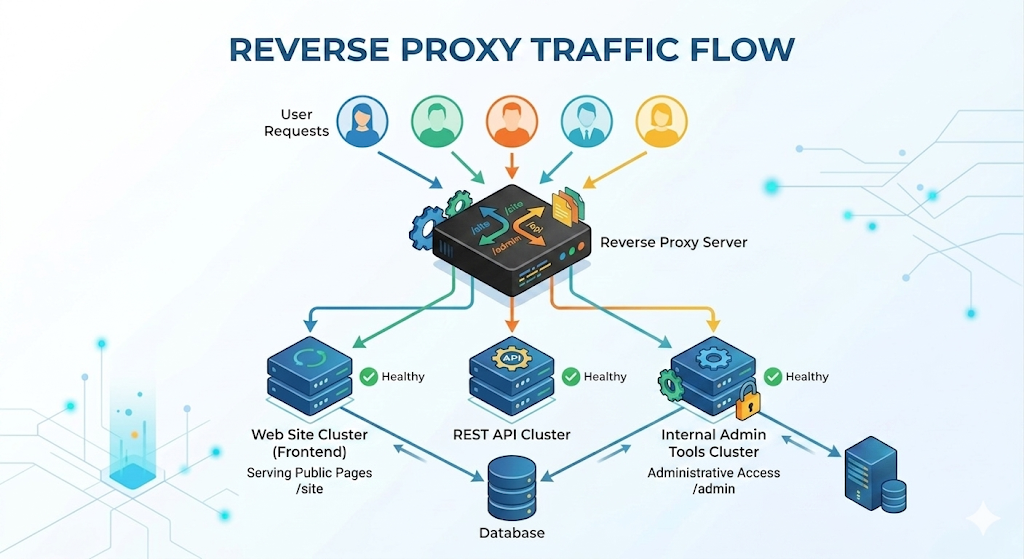
Client -> Reverse Proxy -> App Server(s) -> (DB, cache, etc.)
A key detail: a reverse proxy is still your side of the system.
- A “forward proxy” represents the client (like a corporate proxy or a VPN).
- A “reverse proxy” represents the server side (your infrastructure).
If I had to summarize it in one sentence:
A reverse proxy is a server-side gatekeeper that receives client requests and forwards them to the right internal service, while enforcing edge policies.
What a reverse proxy actually does (the practical checklist)
Different setups use different features, but these are the jobs that show up again and again.
1) TLS termination (HTTPS)
Instead of every app server handling certificates, the reverse proxy can:
- accept
https://connections - do the TLS handshake
- forward traffic to your app servers over HTTP (or re-encrypted HTTPS inside)
This simplifies certificate management and keeps your app code away from the “crypto edge.”
2) Routing (host/path-based)
A reverse proxy can route by:
- hostname:
api.example.comvswww.example.com - path:
/api/*vs/static/* - sometimes headers/cookies (more advanced)
Example mental routing table:
www.example.com/*→ frontend server (or static hosting)api.example.com/*→ backend API serviceexample.com/static/*→ served directly from the proxy
This is one reason reverse proxies are usually discussed as Layer 7 (HTTP-aware).
3) Serving static assets
If your app produces static files (images, CSS, JS, uploads), a reverse proxy can serve them efficiently.
Why this matters:
- App servers are usually optimized for compute + business logic.
- Static files benefit from optimized caching, streaming, and simpler IO paths.
4) Compression and caching (sometimes)
A reverse proxy can:
- compress responses (like gzip / brotli)
- cache certain responses (carefully!)
Caching is powerful but dangerous when you cache the wrong thing.
Beginner rule:
- cache truly static content confidently
- cache user-specific content only if you really understand keys and invalidation
5) Timeouts, buffering, and “slow client” protection
Production traffic is messy:
- some clients are slow
- some requests hang
- some upstreams become sluggish
A reverse proxy gives you a place to set consistent policies like:
- upstream timeouts
- request body size limits
- buffering behavior
This doesn’t magically fix a slow backend, but it helps you fail predictably instead of letting everything pile up.
6) Rate limiting and basic edge security
Many reverse proxies can enforce:
- rate limits (requests per second)
- IP-based allow/deny rules
- basic bot filtering
Think of it as a bouncer at the door.
Reverse proxy vs load balancer (how I separate them)
These two concepts overlap a lot in real products, so I try to separate them by intent.
Similarities (what’s the same)
- Both are server-side components that receive requests and forward them to upstreams.
- Both can do health checks, observability/logging, and some forms of routing.
- At Layer 7, both can look very “HTTP-aware” (paths, hosts, headers).
Load balancer: “Which replica should get this?”
A load balancer’s core job is distribution:
- spread requests across multiple identical app servers
- avoid unhealthy instances using health checks
Routing policies like round robin, least connections, or IP hash live here.
Reverse proxy: “How should requests enter the system?”
A reverse proxy’s core job is edge behavior:
- TLS termination
- host/path routing
- static assets, compression
- request/response shaping (timeouts, limits)
One quick way to spot the difference:
- You can use a reverse proxy even with one backend server (it still adds value: TLS, routing, timeouts, headers).
- A load balancer matters most when you have multiple backends (replicas) and need distribution and failover.
Reality: one box can do both
In practice, one component can play both roles.
Common deployments:
A) Reverse proxy and load balancer combined
Client -> L7 Load Balancer (acts like reverse proxy) -> App replicas
Many managed cloud L7 load balancers do TLS + routing + health checks, which makes them “reverse proxy-ish.”
B) Reverse proxy in front of a load balancer
Client -> Reverse Proxy -> Load Balancer -> App replicas
This can happen when you want extra control at the edge (custom routing rules, special headers, more detailed logging), but still want a dedicated balancer behind it.
C) Reverse proxy without load balancing
Client -> Reverse Proxy -> Single App Server
This is surprisingly common early on.
Even with one server, a reverse proxy can still give you:
- clean HTTPS setup
- a stable front door
- an easy migration path to multiple app servers later
The gotchas that usually bite you first
These aren’t “advanced,” they’re just the things that show up the moment you put a proxy in the middle.
1) The app no longer sees the real client directly
Your app server receives a request from the proxy.
So you need a way to preserve “original client” info:
- client IP
- original protocol (http vs https)
- original host
You’ll often see headers like:
X-Forwarded-ForX-Forwarded-ProtoX-Forwarded-Host
Beginner warning: don’t blindly trust these headers from the open internet.
Your app should only trust them when they come from your own proxy/load balancer.
2) Redirects and URLs can look wrong
If your proxy terminates TLS and forwards HTTP to the app, the app might think the request was http:// and generate redirects to http://....
This usually becomes:
- “Why is my login redirecting to HTTP?”
- “Why are my secure cookies not behaving?”
The fix is usually to make the app aware of the original scheme via forwarded headers (and configure your framework to trust the proxy).
3) Timeout mismatch can cause weird failures
If the proxy timeout is 30s but your app allows 60s, you can get:
- proxy drops the connection
- app keeps working anyway
- client sees a timeout
- retries happen
- your backend load spikes
Beginner rule: keep timeouts aligned and intentional.
What I’m still figuring out (so I don’t pretend this is “done”)
This is the part I want to be honest about: reading about reverse proxies gives me the concepts, but the real understanding will come when I actually configure one and debug the first weird issue.
Things I expect to look up / verify when I do it for real:
- The exact settings for forwarded headers and “trust proxy” in whatever framework I’m using.
- How to choose good timeout defaults (and how they interact with client retries).
- What features I should keep at the proxy vs in the app (rate limiting, caching, auth checks).
- How logging and tracing looks when a proxy is in the middle (so debugging stays sane).
Quick recap
A reverse proxy is not “enterprise fluff.” It’s a practical boundary:
- your app focuses on business logic
- your proxy handles edge concerns (TLS, routing, timeouts, headers, static assets)
And once you have it, scaling out and adding more services usually becomes less chaotic.