DNS (Domain Name System) is the thing that turns api.example.com into an IP address like 203.0.113.10.
That sentence is true… but it hides the part that actually matters in system design:
- DNS is distributed, not centralized.
- DNS uses caching aggressively.
- DNS answers can be stale on purpose.
- DNS is a performance tool and a failure mode.
When I first learned DNS, I treated it like a phone book:
“You look up a name, you get a number.”
In real systems, DNS behaves more like a map app:
- It tries to be fast (so it caches).
- It sometimes routes you around problems (GeoDNS / load-balancing).
- Sometimes it’s wrong for a while (because caches haven’t expired).
Let’s build a mental model that matches production reality.
The One-Sentence Mental Model
DNS is a hierarchical, distributed database that answers questions like:
“For this name, what’s the record of type X?”
And the system is designed to be:
- Globally scalable
- Independently operated (different organizations own different parts)
- Fast via aggressive caching
The Cast of Characters (Who Does What)
When you type a domain name into a browser, multiple “DNS actors” might touch the request.
1. Stub Resolver (Your Device)
Your laptop or phone doesn’t usually walk the global DNS hierarchy itself. It asks a DNS server configured by your network (Wi‑Fi router, ISP, company network, VPN), typically called a recursive resolver. The stub resolver checks local caches (your OS cache) and sends a DNS query out if it needs the answer.
2. Recursive Resolver (The “Librarian”)
This is the workhorse. A recursive resolver’s job is to:
- Take a question from a client (“What is the A record for
api.example.com?”) - If it already knows the answer (cached), return it immediately.
- Otherwise, go find the answer by asking other DNS servers.
- Cache what it learns for next time.
Examples: Cloudflare (
1.1.1.1), Google (8.8.8.8), ISP resolvers.
3. Authoritative Nameserver (The Source of Truth)
An authoritative nameserver is “the final authority” for a domain (or, more precisely, for a zone). It doesn’t recurse or go hunting. It answers strictly from its own data:
“For example.com, here are the records I serve.”
4. Root Servers and TLD Servers (The Directory)
To find the authoritative servers for a domain, resolvers consult the hierarchy:
- Root (
.) - TLD (Top-Level Domain, like
.com,.org,.in) - Authoritative Servers (like
ns1.provider.net)
The root servers don’t know your site’s IP. They know where the .com servers are.
The .com servers don’t know your site’s IP either. They know where example.com’s nameservers are.
How Resolution Actually Works (Step-by-Step)
Let’s say your browser needs to connect to www.example.com. Assume nothing is cached locally or at your recursive resolver.
- The App Asks the OS: The browser asks the OS to resolve the name. The OS checks its local cache and
hostsfile, then queries the recursive resolver. - Recursive Resolver Checks Cache: No cache found? It starts the hunt.
- Ask a Root Server: "Who handles
.com?" → Gets a referral to.comservers. - Ask a
.comTLD Server: "Who handlesexample.com?" → Gets a referral toexample.com's authoritative nameservers (and often some "glue records"). - Ask the Authoritative Nameserver: "What is the
Arecord forwww.example.com?" → Gets the answer:93.184.216.34(with a TTL of 300 seconds). - Cache and Return: The recursive resolver caches the answer and gives it to your device. Your device caches it. The browser finally connects.

DNS Hierarchy: Zones and Delegation
DNS is split into chunks called zones.
A common confusion I had early on: “Is example.com the same thing as the DNS zone?” Not always.
A zone is basically a portion of the DNS namespace served by a specific set of authoritative nameservers.
Delegation is how control is handed off down the hierarchy:
- The
.comzone delegatesexample.comto your nameservers viaNSrecords. - Your
example.comzone might further delegatesub.example.comto a completely different DNS provider or internal network.
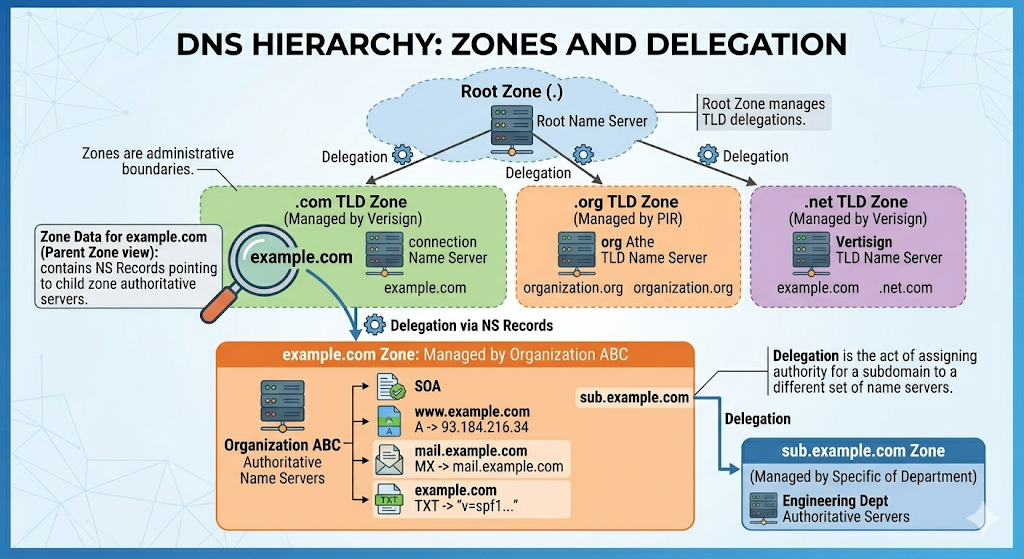
This is how the internet scales without one central DNS database.
Where DNS Settings Actually Live
This is the operational detail that confused me the first time I bought a domain. There are usually three different “places” people mix up:
1. Registrar (Where you buy the domain)
Examples: Namecheap, GoDaddy.
At the registrar, the most important DNS setting is the NS delegation: Which nameservers are authoritative for this domain? Changing this doesn't change your IPs directly; it changes who is allowed to answer for your zone.
2. Registry / TLD Operator (The parent zone)
For a .com domain, the .com registry operates the parent zone that contains the delegation to your nameservers. This is why nameserver changes can sometimes take longer to settle—there’s a parent-zone delegation involved, and resolvers cache those too.
3. DNS Hosting Provider (Where you edit records)
Examples: Cloudflare DNS, AWS Route 53, GCP Cloud DNS.
This is where you create and update your actual records (A, CNAME, TXT, etc.).
The real-world setup: Buy the domain at a registrar → point the registrar to a DNS hosting provider’s nameservers → manage records inside the DNS hosting provider.
Debugging Tip: When DNS “doesn’t work,” ask yourself: “Am I changing records in the provider that is actually authoritative for the domain right now?”
The DNS Records You Actually Meet
DNS answers questions of the form: “For name N, give me record type T.”
| Record Type | What it Does | Real-World Example & Notes |
|---|---|---|
| A / AAAA | Maps a name to an IP address (IPv4 / IPv6). | api.example.com A 203.0.113.10Modern clients often try IPv6 (AAAA) first. |
| CNAME | Aliases one name to another name. | api.example.com CNAME api.mycdn.netCannot co-exist with other record types at the same name. |
| NS | Declares which nameservers are authoritative. | example.com NS ns1.dns-provider.netUsed at delegation points. |
| SOA | Start of Authority; holds zone metadata. | Contains primary NS, serial numbers, and negative caching timers. |
| MX | Defines where email for a domain should go. | example.com MX 10 mail1.example.com |
| TXT | Arbitrary text. | Used heavily for domain verification and email security (SPF/DKIM/DMARC). |
| ALIAS / ANAME | Provider-specific pseudo-records. | Solves the "no CNAME at the apex (example.com)" rule. Acts like a CNAME but resolves as an A record. |
TTL, Caching, and "Propagation"
This is the part that causes the most pain in real life.
TTL (Time To Live) is not “how long until the internet updates.” It is how long a resolver is allowed to cache an answer. If TTL = 300, it means: “You may reuse this answer for up to 300 seconds.”
"DNS propagation" is not a magical global broadcast. It is simply old answers expiring at different times in different caches (browser, OS, router, ISP).
The Migration Playbook
- A day (or more) before a migration, lower your TTL (e.g., from
86400to300). - Wait long enough for the old, long TTL to age out globally.
- Perform your change.
- After stability, raise the TTL again.
(Skip step 2, and you will have users hitting the old IP for 24 hours).
Practical Debugging: Stop Guessing
When DNS breaks, guessing is expensive. The core skill is asking DNS the exact question you care about and seeing who answers. Here is the cheat sheet:
Check the current answer (and bypass browser cache):
dig api.example.com A
dig api.example.com AAAA
(On Windows, clear your OS cache with ipconfig /flushdns)
See the whole delegation chain:
dig +trace api.example.comQuery a specific public resolver (e.g., Cloudflare or Google):
dig @1.1.1.1 api.example.com A
dig @8.8.8.8 api.example.com A
Query your authoritative nameserver directly:
# First, find your nameservers
dig example.com NS

# Then, ask one directly
dig @ns1.dns-provider.net api.example.com A
If the authoritative server has the right IP, but users see the old one, it’s almost always a caching issue.
The Gotchas I’d Warn My Past Self About
- Changing DNS is never instant. It’s bounded by TTLs.
- CNAME at the apex is a trap. Use ALIAS/ANAME records if your provider supports them, or A records.
- “It works on my laptop” is a lie. VPNs, browser DoH (DNS over HTTPS), and ISP caching mean your laptop's reality isn't your user's reality.
- IPv6 can surprise you. If AAAA points somewhere wrong but A is correct, clients prioritizing IPv6 will fail mysteriously.
- Wildcards hide mistakes.
*.example.commeans your typos will happily resolve and send you to the wrong place. - DNS is part of your uptime. If your DNS provider goes down, no one can find your load balancer.