For a while, I treated load balancers as “enterprise stuff.” My thinking was: if my Node.js app works on one machine, why add another box in front of it?
Then I looked at what I had actually built.
I had ~30 REST endpoints. On localhost, every request feels instant because I am the only user. But production is not “one request at a time.” It’s bursts: many users hitting the same heavy PostgreSQL queries at the same moment.
On a single server, that turns into:
- CPU and memory spikes (the app becomes the bottleneck)
- a single point of failure (if it crashes, everything goes dark)
A load balancer is basically the simplest way to remove “one machine” as both the bottleneck and the failure cliff.
The mental model I use
I think of a load balancer like a dispatch desk.
Clients don’t call your backend machines directly. They call one stable “front door,” and the dispatch desk forwards each request to one of many identical workers.
In picture form:
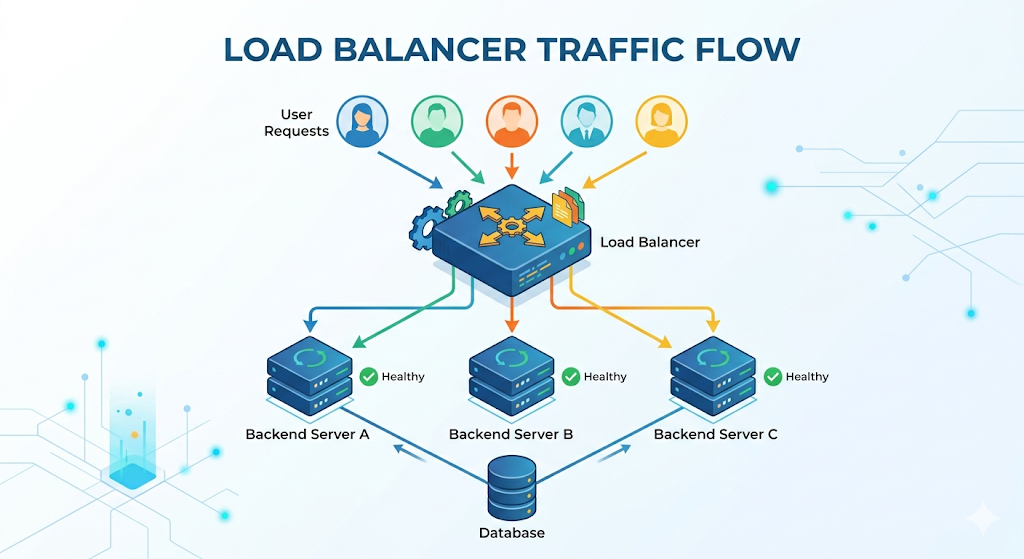
Client -> Load Balancer -> App Server A/B/C -> (Postgres, Redis, etc.)
The important part is not the diagram. It’s the contract:
- The load balancer owns the public entry point.
- Your app servers can be added/removed without clients knowing.
One subtle detail: the load balancer should not become the new single point of failure. In practice, you usually use a managed load balancer (built-in redundancy) or run load balancers in a highly available setup.
So what does the load balancer actually do?
In practice, it makes a few decisions on every request:
- “Which backend should get this?” (routing)
- “Is that backend healthy right now?” (health awareness)
- Sometimes: “Should I keep this user on the same backend?” (session affinity / sticky sessions)
Most of the magic is just those three questions, repeated all day.
Types of load balancers
When I first learned load balancing, I thought there was “one load balancer.” In reality, people mean a few different things depending on where it sits and what layer it operates on.
1) Layer 4 (L4) vs Layer 7 (L7)
- L4 load balancer (TCP/UDP): routes connections based on IP + port. It doesn’t really understand HTTP. Think: “I don’t care what the request means, I just forward the connection.”
- L7 load balancer (HTTP/HTTPS): understands HTTP and can route based on host, path, headers, cookies, etc. Think: “I understand
/apivs/staticand can route differently.”
Beginner shortcut:
- If you need path-based routing, TLS termination, or HTTP-specific behavior, you are usually in L7 territory.
- If you want very fast, simple connection-level distribution, L4 is often enough.
2) External vs internal
- External (internet-facing): the public front door that clients hit.
- Internal (private): balances traffic inside your network (for example, between services).
3) Managed vs self-hosted
- Managed load balancer: your cloud provider runs the redundancy, scaling, and patching.
- Self-hosted (software) load balancer: you run it yourself (more control, more operational responsibility).
These categories overlap a lot. For example, an “external managed L7 load balancer” is a very normal setup.
Routing isn’t random (it’s a policy)
I used to assume it sprays traffic randomly. It doesn’t. You choose a strategy.
- Round robin: rotate through servers in order (A, then B, then C…). Simple, surprisingly decent.
- Weighted round robin: like round robin, but some servers get a bigger share (useful when one machine is stronger or you are gradually shifting traffic during a rollout).
- Least connections: send new requests to the server with the fewest active connections. Useful when requests vary a lot (some are tiny, some are slow).
- Least response time (or latency-aware): prefer the backend that has been responding the fastest recently. Helpful when “connections” don’t tell the full story.
- IP hash: route based on a hash of the client IP so the same client tends to hit the same backend. This can approximate stickiness (but it can behave badly behind NAT or mobile networks where many users share or change IPs).
- Random: surprisingly okay for many cases (especially with enough servers), but less predictable than the options above.
The exact algorithm matters less than the fact that the load balancer is doing the “spread the work” job consistently.
The part that forced me to learn statelessness
The first question I had was: “If request 1 goes to Server A and request 2 goes to Server B… won’t Server B forget the user?”
That’s the core reason people keep repeating “make your app stateless.”
If you store session state in a server’s memory, you’ve accidentally created a hidden rule:
This user must keep hitting the same server.
You can enforce that rule with sticky sessions (the load balancer pins a client to one backend). It works… until it doesn’t:
- if that pinned server dies, the user loses the session
- it makes scaling and deployments more annoying than they need to be
This is why Redis clicked for me.
If session data (and often caching) lives in a shared store like Redis, then any app server can handle any request. My Node.js servers stop being “special snowflakes” and become replaceable workers.
The safety feature: health checks
Distributing traffic is useless if you distribute it to a dead server.
Load balancers typically probe each backend on a schedule (for example, calling something like GET /health every few seconds). If a server fails to respond successfully (often 200 OK), the load balancer stops sending it traffic.
This is the difference between:
- “one server died → 33% of users get errors forever”
- “one server died → traffic shifts to the remaining servers automatically”
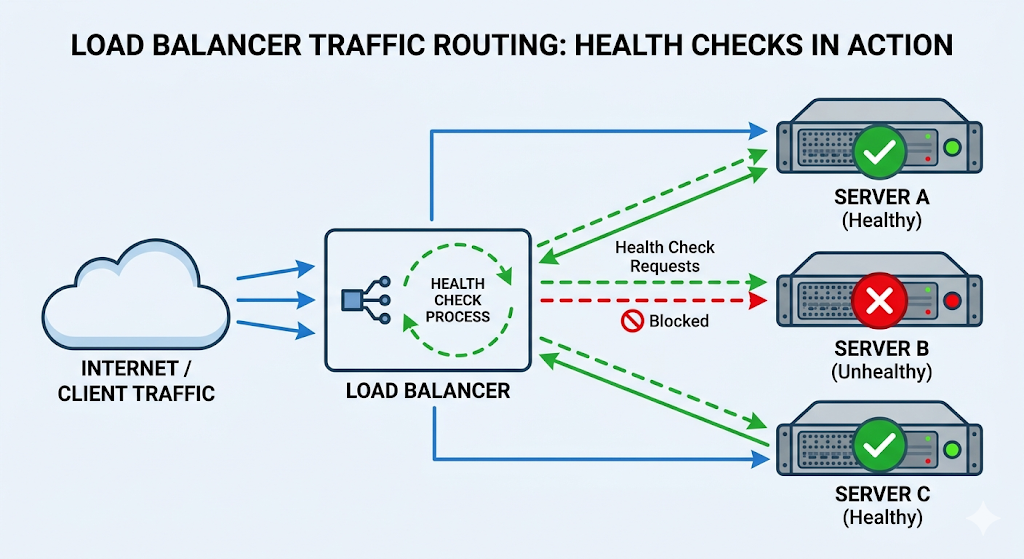
Two notes I keep reminding myself
- A load balancer doesn’t make slow dependencies fast. If Postgres is the bottleneck, scaling app servers can make things worse (you’ll just pile more concurrent load onto the same database).
- Sometimes you already have one. Many platforms (serverless or managed hosting) hide load balancing behind the scenes. You might not configure it, but the pattern is still there.
That’s it. A load balancer isn’t “extra enterprise complexity” so much as a very practical tool: one stable front door, many interchangeable workers, plus health checks to keep the system from routing into a brick wall.