A CDN (Content Delivery Network) is the reason a website can feel fast for someone in Tokyo even if the “real server” is in Virginia.
When I first heard “CDN,” I assumed it meant:
“They host your files somewhere else.”
That’s sometimes true, but the more useful mental model is:
- A CDN is a globally distributed reverse proxy.
- It can cache responses physically close to users.
- It provides security and reliability at the edge.
In system design terms, CDNs are one of the biggest “free wins” for latency and origin protection—until you accidentally cache the wrong thing.
The One-Sentence Mental Model
A CDN is a network of edge servers that sits between clients and your origin. It tries to answer requests from a nearby cache; on a miss, it fetches from your origin, caches the response (when allowed), and serves it.
The Cast of Characters (Who Does What)
1. The Client
The browser or app making requests: GET /app.js, GET /images/logo.png, GET /api/users/me, etc.
2. The Edge (POP)
A CDN has Points of Presence (POPs) around the world. The edge POP is the “nearest” CDN location (nearest in network routing terms, not necessarily physical distance on a map). The edge:
- Terminates TLS.
- Enforces edge rules (WAF, bot mitigation, rate limits).
- Checks its cache.
- Fetches from an origin if needed.
3. The Origin
The “source of truth” for your content. Origins can be:
- Your app servers sitting behind a load balancer.
- An object store (S3, Azure Blob, GCS).
- A static hosting service.
4. Shield / Mid-Tier Cache (Optional)
Many CDNs have an extra layer between the edge POPs and your origin, often called an “origin shield” or “tiered cache.”
- Why it exists: Without shielding, 200 different edge POPs missing the exact same file can stampede your origin. With shielding, POPs can miss at the edge but hit in the shield layer, drastically reducing origin load.
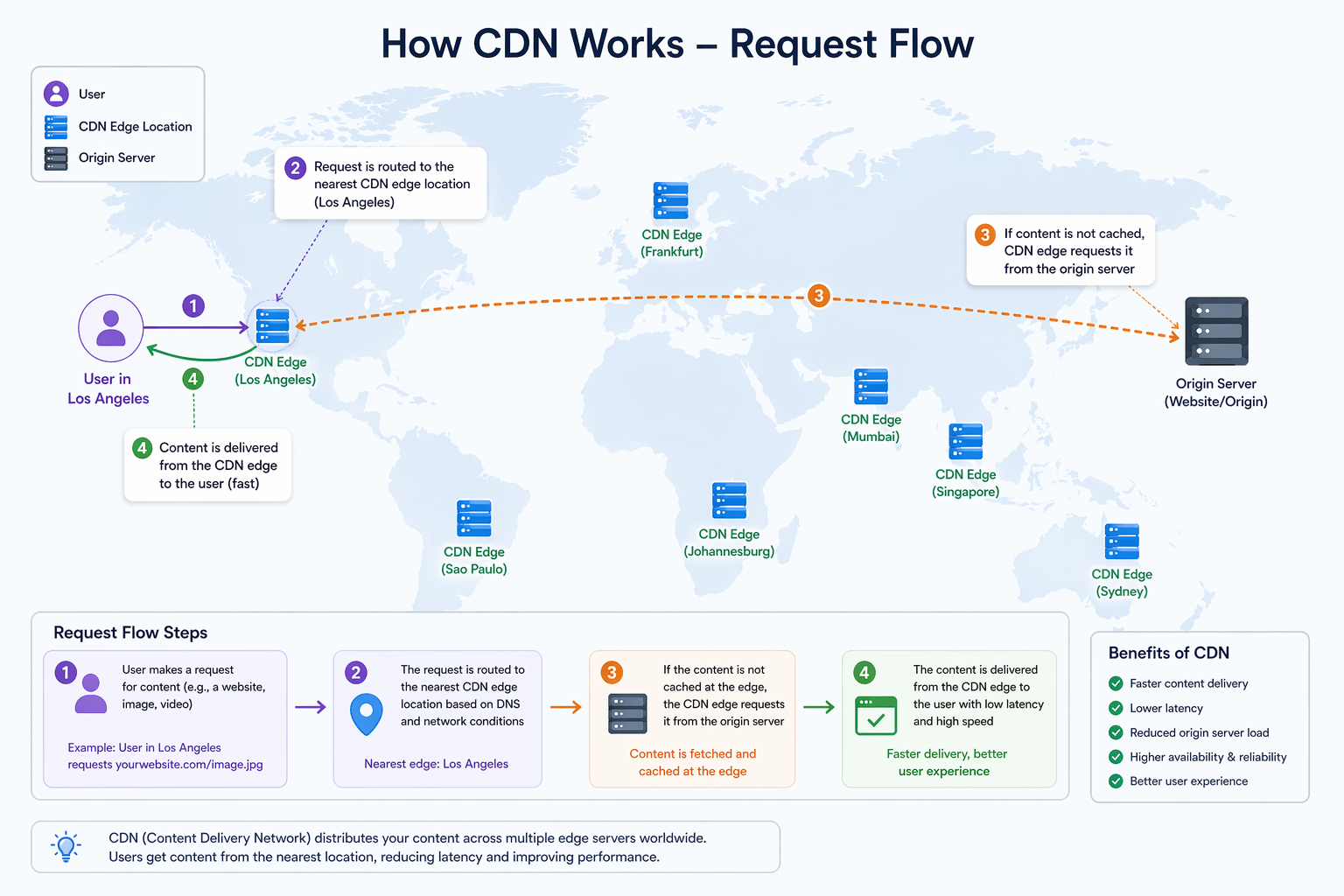
How Traffic Reaches a CDN Edge (DNS + Anycast)
A question I had early on was: “How does the client know which CDN POP to use?” Usually, it’s a combination of DNS and Anycast.
1. DNS returns a CDN hostname (CNAME)
You configure a delegation: www.example.com CNAME example.cdn-provider.net. Then, the CDN provider’s DNS answers with an IP.
2. DNS returns CDN IPs directly
Some providers give you A/AAAA records to set at your domain's apex.
In both cases, the IP you get is frequently an Anycast IP:
- Many CDN servers around the world advertise the exact same IP address.
- Internet BGP routing naturally takes your packets to the “nearest” healthy POP.
TL;DR: DNS decides “this should go to the CDN network,” and Anycast routing decides “which POP you hit.”
What a CDN Actually Does
Different CDNs expose different features, but these four jobs show up everywhere:
- Caching: The core feature. If the CDN has a fresh cached response, it serves it immediately. If not, it fetches from the origin and stores it for later.
- Performance Optimizations: Compression (gzip/brotli), HTTP/2 and HTTP/3 termination, connection reuse to the origin, and sometimes on-the-fly image optimization.
- Origin Protection: Reduces how often your origin is hit, which lowers cloud egress costs, prevents burst-load crashes, and absorbs junk traffic.
- Edge Security: DDoS mitigation, Web Application Firewalls (WAF), bot protection, and rate limiting. Even if you don’t buy a CDN "for security," you will likely use these features.
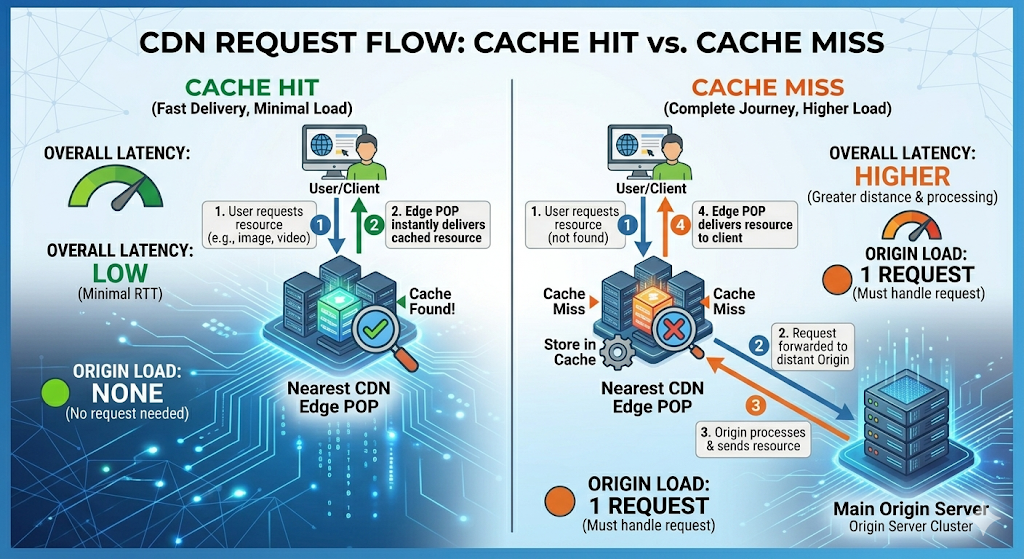
The Request Flow (Hit vs. Miss)
Scenario A: Cache HIT
- Client requests
GET /static/app.9f3a1c.js - Edge checks its cache using a cache key.
- The cached response is found and is fresh → Edge returns it.
- Result: Very low latency, and your origin server sees absolutely nothing.
Scenario B: Cache MISS
- Client requests
GET /static/app.9f3a1c.js - Edge doesn’t have it (or it expired).
- Edge fetches it from the origin (or shield).
- Edge returns it to the client.
- Edge caches it for the next user (if HTTP headers allow).
- Result: Slower response (origin round-trip), and your origin takes the traffic.
Scenario C: Stale / Revalidation
This is where CDNs feel “magical” but confusing. If an object is in the cache but its TTL has expired (stale), the CDN might:
- Revalidate with the origin (sending a conditional request using
ETagorLast-Modified). - Serve stale content immediately while it revalidates in the background (if configured to do so).
Pull vs. Push CDNs (Where the Data Comes From)
Most web CDNs you interact with today are pull-based, but it's important to know the difference for system design:
- Pull CDNs (The standard proxy): The edge fetches from your origin on demand. The first request causes a cache miss, the CDN pulls the file, and subsequent requests are hits. This is easier to integrate because your origin remains the single source of truth.
- Push CDNs (The storage bucket): You upload (push) your content directly to the CDN ahead of time as part of your deployment pipeline. There is no "origin server" to fall back on if a file is missing. This is great for purely static distributions (like large game patches or static site generators) but requires a dedicated publishing workflow.
The Most Important Idea: The Cache Key
The CDN doesn’t just cache “a URL.” It caches a response under a cache key.
A cache key is typically built from:
- Hostname (
www.example.com) - Path (
/static/app.js) - Query string (
?v=123) — depending on settings - Specific headers (
Accept-Encoding) - Cookies — (dangerous!)
If your cache key is wrong, your caching will be wrong.
- Cache fragmentation: Too many distinct keys (e.g., caching every unique
utm_sourcetracking parameter separately) → extremely low hit rate. - Cache poisoning / leaks: Too few distinct keys → serving User A's private data to User B.
HTTP Headers That Control CDN Caching
A CDN largely follows standard HTTP caching semantics. These are the directives you need to know.
The Cache-Control Header
| Directive | What it means |
|---|---|
public |
May be cached by shared caches (like CDNs). |
private |
Meant for a single user (CDNs generally will not cache this). |
no-store |
Do not store this response anywhere, ever. |
no-cache |
Can be stored, but the cache must revalidate with the origin before serving it. |
max-age=... |
How many seconds clients (browsers) may cache the asset. |
s-maxage=... |
How many seconds shared caches (CDNs) may cache the asset. |
stale-while-revalidate |
Serve stale content instantly to the user while fetching an update in the background. |
Beginner Rule of Thumb:
- For versioned static assets:
Cache-Control: public, max-age=31536000, immutable- For HTML that changes: Short TTL, or
no-cachewithETagrevalidation.- For user-specific API responses:
privateorno-store.
ETag and Last-Modified (Revalidation)
Origins can tag responses with an ETag (a hash of the content) or a Last-Modified timestamp.
Caches can then ask the origin: "Has this changed since ETag: abc123?"
If it hasn't, the origin replies with 304 Not Modified (an empty body). This saves bandwidth, speeds up refreshes, and ensures cache correctness.
Vary
Vary tells caches: “This response changes based on these request headers.”
Vary: Accept-Encodingis incredibly common because the cache needs to store thegzipandbrotliversions separately.Vary: Cookieis dangerous. It can explode your cache key space or accidentally mix up user sessions if misconfigured.
Invalidation: “How Do I Update Cached Content?”
1. Let the TTL Expire
The simplest approach, but it means waiting.
2. Purge / Invalidate
Telling the CDN: "Forget this specific path right now." This is common for emergency fixes, but purges require operational work, are sometimes rate-limited, and may not be instantly global.
3. Don’t Purge: Use Versioned Assets
This is the industry standard for frontends. You hash the file contents into the filename (app.9f3a1c.js) and set a cache TTL of 1 year. If you change your code, the build process generates a new filename.
- Result: Long cache times, instant global updates, easy rollbacks, and zero reliance on CDN purge APIs.
Practical Debugging: Stop Guessing
When a CDN behaves weirdly, the trick is to inspect the response headers and compare the edge vs. the origin.
Useful tools:
# Check headers going through the CDN
curl -I https://www.example.com/static/app.js

# Bypass the CDN and hit the origin directly (if you know the IP/hostname)
curl -I --resolve www.example.com:443:192.168.1.100 https://www.example.com/static/app.js
Things to check first:
- Is the response being cached at all? (Look for
CF-Cache-Status: HIT,X-Cache: HIT, etc.) - What is the TTL? Look for
Age: 123(how many seconds it has been in the cache). - Is the CDN bypassing the cache because of cookies or authorization headers?
Common failure modes:
- “Why is it always a MISS?” → You are sending cookies,
private,no-store, or your query strings are fragmenting the cache. - “Why is one user seeing another’s content?” → Your cache key is too broad. You are caching personalized responses without a
Varyheader or without bypassing the cache for authenticated users. - “Why didn’t my change show up?” → The TTL hasn't expired, the purge didn't complete, or your browser is locally caching it.
The Gotchas I’d Warn My Past Self About
- Caching is a correctness problem, not just performance. You can easily cache the wrong thing.
- Cookies and Auth headers are danger signs. Default to bypassing the cache when they’re present.
- Query strings can destroy your hit rate. Tracking parameters (
?utm_source=twitter) will fragment the cache unless your CDN is configured to ignore them in the cache key. - Purges aren’t a strategy. They’re an emergency lever. Prefer versioned assets.
- CDNs don’t replace load balancers. They reduce origin load and latency; they don’t manage your internal server replicas.