If you followed the last post, you have a working server connected to a database. But take a look at your app.js. It’s getting crowded, isn’t it?
While our Database Model lives in its own file, all of our routes and business logic (creating users, fetching data) are still fighting for space inside the main server file. In the industry, we call this "Spaghetti Code." It works for a side project, but if you try to build a real startup on this foundation, it will collapse.
Today, we clean house. We are going to implement the Controller-Route pattern—organizing your code into specific layers to turn your chaotic script into a scalable architecture.
The Logic of Separation
Think of your API like a restaurant:
- The Route (The Waiter): Takes your order and knows where it needs to go.
- The Controller (The Chef): Stays in the kitchen and actually prepares the food (logic).
- The Model (The Pantry): Where the ingredients (data) live.
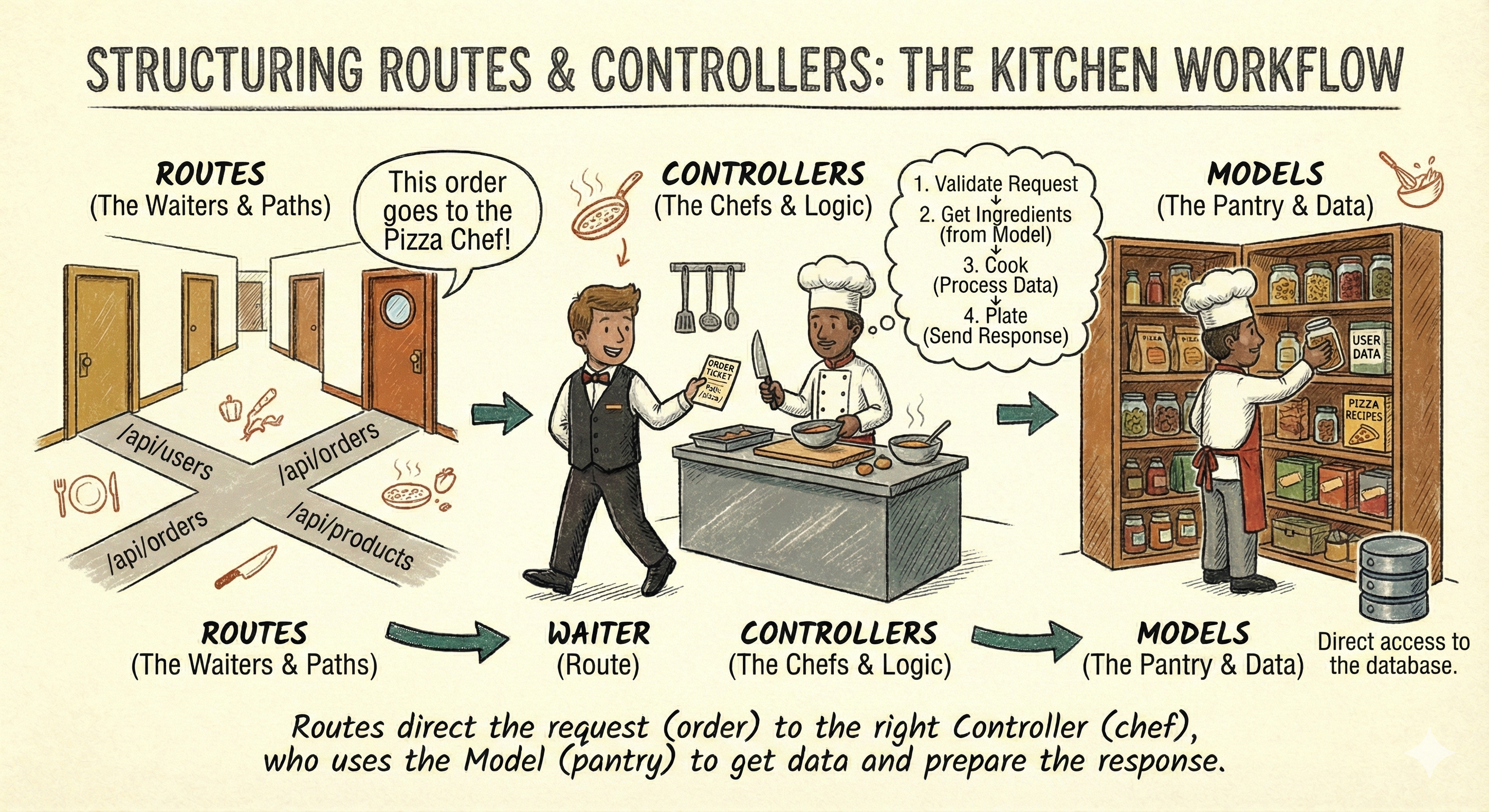
Setting Up Controllers and Routes
Let's break down how to set up this structure in our Express app.
Step 1: Creating the Controller
The controller is where the "heavy lifting" happens. It interacts with the Mongoose model and sends back the response.
Create: src/controllers/user.controller.js
import User from '../models/user.model.js';

// @desc    Get all users
// @route   GET /users
export const getUsers = async (req, res) => {
    try {
        const users = await User.find();
        res.status(200).json(users);
    } catch (error) {
        res.status(500).json({ message: error.message });
    }
};

// @desc    Create new user
// @route   POST /users
export const createUser = async (req, res) => {
    try {
        const newUser = await User.create(req.body);
        res.status(201).json(newUser);
    } catch (error) {
        res.status(400).json({ message: error.message });
    }
};

// @desc    Delete user by ID
// @route   DELETE /users/:id
export const deleteUser = async (req, res) => {
    try {
        const user = await User.findByIdAndDelete(req.params.id);
        if (!user) {
            return res.status(404).json({ message: 'User not found' });
        }
        res.status(200).json({ message: 'User deleted successfully' });
    } catch (error) {
        res.status(500).json({ message: error.message });
    }
};
Step 2: Creating the Route
The route file is where we define the endpoints and link them to the controller functions.
Create: src/routes/user.routes.js
import express from 'express';
import {getUsers, createUser, deleteUser} from '../controllers/user.controller.js';

const router = express.Router();

// Map paths to controller functions
router.get('/', getUsers);
router.post('/', createUser);
router.delete('/:id', deleteUser);

export default router;
Create a static route for the homepage: src/routes/static.routes.js
import express from 'express';

const router = express.Router();

router.get('/', (req, res) => {
    res.send('Welcome to the Node.js Database Intro! API is up and running.');
});

export default router;
Step 3: Integrating Routes into the App
Now we need to tell our app.js to use these routes.
import express from 'express';
import userRoutes from './routes/user.routes.js';
import staticRoutes from './routes/static.routes.js';

const app = express();

app.use(express.json());
app.use(express.urlencoded({ extended: true }))

// User Routes - much cleaner
app.use('/users', userRoutes);

// Static Route
app.use('/', staticRoutes);

export default app;
Benefits of This Structure
- Scalability: As your app grows, you can easily add new controllers and routes
- Maintainability: Each file has a clear purpose, making it easier to find and fix bugs.
- Collaboration: If you're working with a team, this structure allows multiple developers to work on different parts of the app without stepping on each other's toes.
By separating your routes from your business logic, you've moved from a simple script to a professional application architecture. This structure ensures that as you add features like authentication or complex data relationships, your codebase remains navigable and easy to debug.
The Transformation
Look at your app.js now. It’s tiny. It doesn’t know how to create a user; it just knows who to ask.
You have successfully separated your concerns:
- Routes (The Waiters): Take the order and pass it to the kitchen.
- Controllers (The Chefs): Cook the order (logic) and return the food.
- Models (The Ingredients): Define the structure of your data.
But we have a missing piece. Right now, our controllers are completely unprotected. Anyone can ask the chef to make any changes. Shouldn't we have a security guard check the customer's credentials before they bother the chef?
In the next post, we will introduce Middleware—the security guards and quality control inspectors of your Express application—and use it to secure our API.
Happy coding!